Sunflower Seasons 3D Layered Paper Cut for Creative Projects
For artists, hobbyists, and DIY enthusiasts looking to elevate their paper-cutting projects, the Sunflower Seasons 3D Layered Paper Cut offers a compelling blend of design sophistication and practical usability. This template is more than just an artistic pattern—it’s a structured, layered creation that brings depth and dimension to any space or gift. Whether you're crafting for personal enjoyment or preparing unique decorations for events, this template provides a fresh way to express creativity through intricate paper art.
A Unique Approach to Paper Art
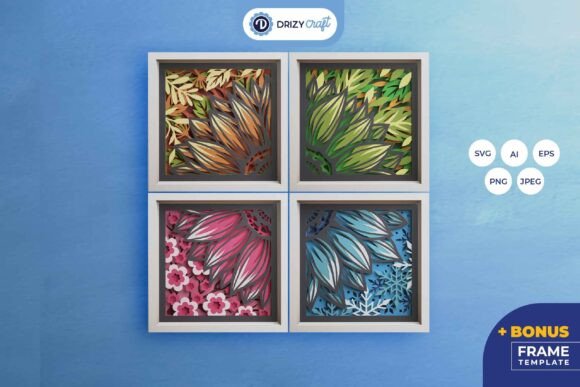
The Sunflower Seasons 3D Shadow Box is a square, layered paper-cutting template designed to deliver a three-dimensional effect when assembled. It features six distinct layers that work together to create a stunning visual representation of sunflowers in different seasonal stages. The layered structure allows light to pass through strategically, enhancing the shadow box’s appearance whether it's displayed as a framed piece or integrated with LED lighting for a modern twist.
This level of detail makes it ideal for those who appreciate the beauty of traditional paper crafts but want to add a contemporary flair. The design is especially useful for individuals interested in creating eye-catching home decor, meaningful gifts, or interactive educational materials that engage both visually and tactilely.
Formats for Every Need
One of the standout aspects of this product is its versatility in file formats. You’ll receive the template in AI, EPS, PNG, SVG, and JPEG formats, each sized appropriately for specific uses. The high-resolution JPEG (3000 x 2000 px) serves as a detailed preview, while the vector-based files (AI, EPS, SVG) are perfect for cutting machines like Silhouette and Cricut. These formats allow for seamless integration into digital workflows, ensuring precision and flexibility during the crafting process.
If you don’t own a cutting machine, no problem—each layer can be cut manually using an art knife or scissors. However, having access to SVG files means professionals and semi-professionals can streamline production and maintain consistent quality across multiple copies, which is particularly valuable for small business owners or educators creating classroom materials.
Practical Benefits for Diverse Users
What sets the Sunflower Seasons 3D Layered Paper Cut apart from other paper templates is how it supports various creative goals. Here’s how it can benefit different users:
- Home Decorators: Transform your living space with a custom-made shadow box that adds warmth and personality. By placing LED strips between the layers, you can create a subtle glow that enhances the room’s ambiance, making it a versatile addition to any interior design style.
- Event Planners: Use this template to craft personalized centerpieces or signage for weddings, birthdays, or corporate events. The ability to resize while maintaining the aspect ratio ensures adaptability for different table sizes or display requirements.
- Gift Givers: Whether for a birthday, anniversary, or holiday, the final product serves as a thoughtful and original gift. Its intricate nature conveys care and effort, and it can be tailored to match recipients’ tastes by choosing different paper colors or adding handwritten notes inside.
- Educators and Tutors: Incorporate the template into lessons on geometry, symmetry, or seasonal themes. The hands-on activity of assembling the layers can help students grasp spatial concepts and develop fine motor skills simultaneously.
Efficiency Meets Creativity
Time is often a constraint for creators, especially those juggling multiple projects or working within tight deadlines. The Sunflower Seasons 3D Layered Paper Cut helps overcome this challenge by offering a pre-designed template that simplifies the creative process without compromising artistic value.
Professionals such as graphic designers or marketers may find it beneficial for promotional campaigns, where quick turnaround times are essential. A custom-sized version of the shadow box could serve as a branded keepsake, combining functionality with aesthetic appeal. Similarly, freelancers involved in event planning or wedding design can use this template to produce high-quality, thematic decorations efficiently.
Design Flexibility and Customization
With the SVG file included, users have the freedom to scale the design to fit their needs, provided they maintain the 714x714 pixel aspect ratio. This scalability is crucial for matching the size of existing frames or adapting the design for large-scale installations. For example, a boutique owner might enlarge the design to serve as a store window decoration, while a teacher might shrink it for a student project.
Moreover, the layered format allows for experimentation with color and material. While the template includes a standard color scheme, many users prefer printing onto colored cardstock or textured paper to make the sunflower pop against the background. This customization potential encourages individual expression and ensures the final product feels unique rather than mass-produced.
Tools and Materials You’ll Need
Before starting, ensure you have the necessary tools. If you’re using a cutting machine like Silhouette or Cricut, the SVG file will guide the machine precisely. Otherwise, a good set of cutting tools, including a sharp blade and a self-healing mat, will suffice. Assembly requires either glue or double-sided tape, depending on your preference and the thickness of the paper you choose.
It’s also worth noting that the final color of the product may vary slightly due to differences in paper stock and lighting conditions. Always test the design with your preferred materials before producing multiple copies, especially if branding or client expectations are at stake.
Who Can Benefit Most?
This product is best suited for adults who enjoy hands-on creative projects and seek ways to enhance their output with minimal hassle. Hobbyists who love papercrafts, small business owners looking to offer bespoke products, and educators aiming to integrate art into learning all stand to gain from using the Sunflower Seasons 3D Layered Paper Cut.
Entrepreneurs selling custom home décor or stationery items can leverage this template to expand their product line without investing in complex design software. Bloggers and content creators can feature it in tutorials or unboxing videos, appealing to a growing audience interested in DIY culture and sustainable, handmade gifts.
Real-World Applications
Consider a scenario where a local café wants to celebrate the arrival of spring. Using the Sunflower Seasons 3D Layered Paper Cut, they could create several wall-mounted pieces to decorate the space. By incorporating warm LED lighting behind the shadow boxes, they transform ordinary walls into vibrant focal points that reflect the season’s energy.
Another example involves a freelance artist preparing for a craft fair. Instead of spending hours designing and prototyping new items, they can quickly assemble multiple versions of the sunflower shadow box using the template, allowing them to focus on pricing, packaging, and marketing strategies.
Limitations and Considerations
While the Sunflower Seasons 3D Layered Paper Cut is highly adaptable, there are some limitations to consider. The fixed number of layers (six per template) means the design won’t accommodate drastically different complexity levels. Additionally, manual cutting requires steady hands and attention to detail, which may not suit everyone. Beginners might want to start with simpler patterns before attempting this one.
Also, the need to preserve the aspect ratio when resizing can restrict certain layout possibilities. For instance, if you want to fit the design into a rectangular frame, you might need to adjust the surrounding elements rather than the design itself. In such cases, comparing similar templates or consulting design forums could help determine the best approach.
Getting Started: Tips and Recommendations
To maximize the potential of this template, here are a few tips:
- Choose the right paper: Thicker cardstock holds up better when assembling the layers, but thinner paper allows for more delicate shadows. Experiment with different weights to see what works best for your intended use.
- Test the lighting effect: If you plan to turn the shadow box into a lightbox, try different types of LED strips to achieve the desired brightness and color temperature. Warm white lights tend to complement the sunflower theme well.
- Plan your assembly: Lay out the layers first before gluing them together. This step ensures that you catch any alignment issues early, avoiding the need to disassemble completed sections.
- Think about framing: A shallow frame with a backing board can help stabilize the shadow box and protect it from dust. If you opt for a lightbox, consider using a transparent acrylic sheet to hold the layers in place while allowing light to pass through.
Supporting Sustainability and Personal Expression
In today’s world, many creators prioritize sustainability and eco-conscious practices. The Sunflower Seasons 3D Layered Paper Cut aligns with these values because it eliminates the need for excessive materials. Unlike printed posters or plastic decorations, this template allows for the reuse of tools and supplies, reducing waste over time.
Additionally, the design invites personalization. Think of how you might incorporate local flora, seasonal greetings, or even a name or date into the shadow box. Such modifications make it not only a decorative item but also a storytelling medium, connecting the viewer to a specific moment or memory.
Why Choose This Template Over Others?
Compared to generic paper-cutting kits, the Sunflower Seasons 3D Layered Paper Cut stands out for its cohesive, thematic structure. It’s not just a collection of shapes; it tells a story through the changing seasons. This narrative element can resonate deeply with viewers, making it a more emotionally engaging piece than abstract designs.
Furthermore, the inclusion of multiple file formats gives users control over their workflow. Professionals can edit and modify the AI/EPS files, while hobbyists can print the PNGs for hand-cutting. This flexibility ensures that the template fits a wide range of skill levels and equipment availability.
Final Thoughts on Value and Versatility
The Sunflower Seasons 3D Layered Paper Cut isn’t just another craft template—it’s a thoughtfully designed tool that bridges the gap between tradition and modernity. Whether used as a standalone decoration, part of a larger installation, or transformed into a glowing lightbox, it opens up numerous creative avenues for those willing to explore them.
Its combination of ease of use, professional-grade files, and customizable elements makes it suitable for a broad audience. From the weekend crafter to the commercial decorator, this template delivers tangible benefits that support productivity, creativity, and personal satisfaction.
Ultimately, the Sunflower Seasons 3D Layered Paper Cut is a testament to the power of simple yet elegant design. It reminds us that even in a digital age, there’s still joy in the tactile experience of cutting, assembling, and displaying something made with our own hands.