Creating Enchanting 3D Mermaid Wall Art with Multilayer SVG Cut Files
If you're looking to elevate your crafting projects with a touch of magic and elegance, the Mermaid 3D SVG Multilayer Paper Cut File is an excellent choice. This intricate design allows crafters to bring underwater beauty into their homes through stunning 3D wall art, shadow boxes, or decorative cards. Whether you're using a Cricut, Silhouette, laser cutter, or CNC machine, this file opens up a world of creative possibilities.
What Makes This Design Unique?
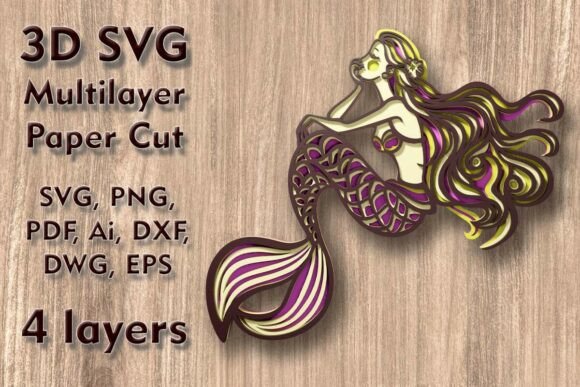
The Mermaid 3D SVG Multilayer Paper Cut File stands out due to its four distinct layers, which together form a dimensional mermaid motif. Each layer is carefully crafted to interlock seamlessly when assembled, creating depth and visual interest that flat designs simply can't match. The result is a piece that feels alive, almost as if it’s dancing across your wall.
This multilayered approach means more than just aesthetics — it also adds complexity and charm to your finished product. From the flowing tail to delicate fins and ornate details, every element contributes to the overall enchantment of the design.
Size and Scalability: Flexibility for Every Project
The original dimensions of the Mermaid 3D SVG Multilayer Paper Cut File are 250 W x 230 H mm (9.85 x 9.06 in), making it ideal for wall art or shadow box displays. One of the most appealing aspects of this file is its scalability. You can easily increase the size to fit larger canvases or custom installations without losing detail.
However, when resizing down, caution is needed. Thin elements such as the mermaid's hair or tail fronds may become too fragile at smaller scales. Always preview the design after scaling to ensure no important parts are compromised. A good rule of thumb is not to reduce the size by more than 30% without testing the cut on scrap material first.
Materials That Work Best with This Design
One of the strengths of the Mermaid 3D SVG Multilayer Paper Cut File is its compatibility with a wide range of materials. Crafters have successfully used:
- Plywood – For a sturdy and long-lasting finish.
- Cardstock or Paper – Perfect for beginners or lightweight wall art.
- MDF – An affordable alternative to wood with smooth cutting results.
- Acrylic Sheets – Adds a modern, translucent look to the design.
- Aluminum – Great for industrial-style decor or metal enthusiasts.
- Cardboard – A budget-friendly option for quick prototypes or temporary decorations.
Choosing the right material depends on your project goals. If you're aiming for a professional-looking wall hanging, consider using plywood or MDF. For a softer, paper-based look that’s easy to paint or color, cardstock is the way to go. Acrylic can offer a glass-like finish, while aluminum provides a sleek and metallic appearance.
Layered Precision for Stunning Results
With four separate layers, precision is key. Each layer must be aligned correctly during assembly to maintain the intended shape and dimensionality. Most cutting machines will handle this process smoothly, especially when paired with quality software like Cricut Design Space or Silhouette Studio.
Some users prefer printing each layer on a different colored sheet of paper before assembling to make the final product even more eye-catching. Others opt for painting individual layers after cutting to add texture and personality. Either way, the layered structure gives you room for customization and creativity.
File Formats Included for Maximum Compatibility
After purchasing the Mermaid 3D SVG Multilayer Paper Cut File, you'll receive a ZIP folder containing multiple file formats to suit your equipment and preferences. These include:
- SVG – Standard format for use with Cricut and Silhouette machines.
- DXF & DWG – Ideal for CNC routers and laser cutters.
- EPS & AI – Preferred by professionals for vector editing in Adobe Illustrator.
- PNG – Useful for visual previews and digital mockups.
- PDF – Great for tracing or printing templates manually.
This variety ensures that no matter what kind of machine you own or how technical your setup is, you can work with the files efficiently. It also makes the design suitable for both hobbyists and commercial crafters who might need to edit the artwork before production.
How to Use the Mermaid 3D SVG Multilayer Paper Cut File
Using this file is straightforward but requires attention to detail. Here’s a simple guide to get you started:
- Download the ZIP folder and extract all the files.
- Select your preferred file format based on your machine type.
- Open the file in your cutting machine software.
- Adjust the size as needed, keeping thin elements in mind.
- Set the correct material thickness and blade depth in your machine settings.
- Cut all four layers individually.
- Assemble the layers using glue, magnets, or mounting hardware depending on your desired outcome.
For best results, test-cut one layer before proceeding with the entire set. This helps verify that the machine is properly calibrated and that the design cuts cleanly without tearing or misalignment.
Applications for the Mermaid Design
The versatility of the Mermaid 3D SVG Multilayer Paper Cut File extends beyond wall art. Here are some popular applications:
- Shadow Boxes – Display the layered mermaid in a shadow box frame for a three-dimensional display.
- Home Decor – Hang the finished piece on walls to create a magical focal point in any room.
- Gifts and Cards – Use the design to make personalized greeting cards, gift tags, or framed holiday decorations.
- Party Decorations – Incorporate the mermaid into themed parties or events, especially those centered around fantasy or oceanic themes.
- Commercial Projects – Artists and small businesses can use the design for selling custom wall art or seasonal items online.
Whether you’re creating something for yourself or a customer, the mermaid design adds a whimsical and artistic flair that's sure to impress. It’s particularly popular during holidays and special events where unique, handmade décor is in demand.
Why Choose a Multilayer SVG for Your Next Project?
There are several reasons why the Mermaid 3D SVG Multilayer Paper Cut File is a top pick among crafters:
- Time-Saving – The pre-designed layers eliminate the need for manual layout or drafting.
- Professional Look – With precise lines and consistent spacing, the final product looks polished and refined.
- Customizable – Easily modify colors, materials, or background textures to suit your style.
- Easy Assembly – Designed for clean edges and alignment markers, making the build process intuitive.
- High-Quality Output – Compatible with advanced tools like Glowforge and CNC routers for clean, accurate cuts.
These advantages make the Mermaid 3D SVG Multilayer Paper Cut File a valuable addition to your digital library. It’s not just a template — it’s a foundation for endless creative expression.
Common Considerations Before Cutting
Before diving into your project, there are a few things to keep in mind:
- Machine Compatibility – Ensure your software supports layered SVG files. Some basic programs may require additional steps to manage multiple layers.
- Material Thickness – Thicker materials may require stronger blades or slower cutting speeds. Always follow manufacturer guidelines for your machine and material combo.
- Glue Type – Use a strong adhesive like E6000 or hot glue for permanent installations. For easier disassembly or adjustable placement, try double-sided tape or magnetic backing.
- Lighting Effects – Consider adding LED lights behind the shadow box for a glowing effect that enhances the mermaid’s presence.
- Storage and Transport – When working with paper or cardboard, store completed pieces in a dry place to avoid warping or damage.
By planning ahead and addressing these factors, you’ll maximize the success of your project and enjoy a smoother crafting experience from start to finish.
Perfect for Seasonal and Year-Round Creativity
The Mermaid 3D SVG Multilayer Paper Cut File isn’t limited to any particular time of year. While many crafters love using it for holiday-themed wall art, it’s equally at home as a permanent decoration in living rooms, nurseries, or even office spaces. Its ethereal theme complements bohemian, coastal, or fantasy-inspired interiors beautifully.
Seasonally, the mermaid design fits well into spring and summer décor. Pair it with seashells, coral accents, or floral backgrounds to enhance the oceanic vibe. During winter, you can creatively adapt the design by adding snowflakes or starlight effects, turning it into a whimsical holiday centerpiece.
Enhancing Your Crafting Workflow
In today’s fast-paced crafting world, efficiency is essential. The Mermaid 3D SVG Multilayer Paper Cut File streamlines your workflow by providing everything you need in one package. Instead of spending hours designing your own layered pattern, you can focus on bringing the design to life with your favorite tools and techniques.
Many crafters integrate this file into their regular projects by combining it with other SVGs or adding painted textures, glitter, or fabric elements. The ability to work with various materials and tools makes it adaptable to different styles and skill levels, ensuring it remains a favorite among both novices and seasoned artists.
For educators and hobby groups, this file is also a great teaching tool. It introduces learners to multi-layer design concepts and offers hands-on experience with cutting and assembling. Plus, the final product is always visually rewarding, encouraging further exploration and experimentation.
Where to Find the Mermaid 3D SVG Multilayer Paper Cut File
Once you’ve seen the potential of the Mermaid 3D SVG Multilayer Paper Cut File, you’ll want to get your hands on it. It's available for purchase on popular crafting marketplaces and dedicated SVG stores. Make sure to read reviews and check compatibility with your specific machine before buying.
After purchase, you’ll typically receive instant access to download the ZIP folder. Always save the files in a secure location and back them up to avoid accidental loss. Some platforms also offer customer support or tutorials, which can be helpful if you're new to layered SVGs.
Conclusion
The Mermaid 3D SVG Multilayer Paper Cut File is more than just a design — it's a gateway to creating beautiful, handcrafted art that stands out in any space. Whether you're making a personal keepsake or preparing for a pop-up shop, this file delivers the quality and flexibility you need to succeed.
Its blend of functionality and aesthetic appeal makes it a favorite among crafters who value both ease of use and artistic impact. So grab your cutting machine, choose your favorite material, and let the magic of the mermaid inspire your next creation.